


Problem Statement
One C 2.0 needs to be the version of One Cognizant platform which focuses on shifting User experience from Application metaphor to Transaction Metaphor.
It needs to be a single platform that will encompass all the below mentioned features to cater these transactions (Activity, Task, Approval, Info) based user interface.
The new OneC needs to be given a fresh look. It needs to enhance user centric design options and experience for the users.
The UI needs to be more appealing and meaningful. It needs to be designed based on fresh design ideas and thoughts, best fit for unified enterprise experience across Mobile (Native) & Desktop (Responsive)
Appealing Image language relevant and appropriate to nature of interaction (Graphics / Human faces) to be used.

Design Process


Key Insights

Multiple Apps for a single task and difficulty in relating intent of the app
The search result does not provide enough information to determine which app is relevant to the precise phrase supplied in a search. The titles of the applications are unclear and do not convey the aim of it. This increases the user's cognitive strain, reducing their relative exposure. Every additional unit of information in a conversation competes with the relevant pieces of information, reducing their relative exposure.

.png)
Inconsistent Feedback Status
Some applications provide no feedback after finishing a certain activity. The system should offer feedback to the user in order to keep them up to date on the status of the task. Keeping the user informed about the consequence of the action reduces the user's memory burden. The system should always keep users aware of what is going on by providing suitable feedback in a timely manner.
No assistance provided while performing a task
The majority of the applications in the employee portal do not provide a comprehensive perspective of the jobs they are performing. Users should be guided by the application as to where they are and where they wish to go, and how they will get there. When relevant, the system's operating instructions should be shown, and the user should not be required to recall information while doing various activities.
.png)
.png)
System notifications go unnoticed
Make objects, actions, and choices visible to reduce the user's memory burden. The user should not have to recall information from one section of the chat to the next. Instructions for use of the system should be visible or easily retrievable whenever appropriate. The service alert part on the top right of the home page has low visibility or no visibility, so the user misses it. There is no visual alarm indicator provided.
Other Insights
-
Misleading Icon tool tips.
-
System does not segregate task on any priority parameters.
-
The present portal does not have a feature of having a holistic view of all the team mates responsibility and status, users have to look into individual team mates activity
-
Its difficult to find the FAQ section in the present portal.
-
User Interface
UI is not appealing,
Performance is very slow
Should support UHD screens -
Usability
Homepage to fit in singular view without page scroll
No option to do multiple approvals in a click
.png)

Persona

Persona created for an Associate

Persona created for a Manager

Persona created for an Associate Director
User Journey Map
Mary has been very busy lately, her hectic project deliverables and other team mates responsibility has let to compounding pending approval requests. Over and above she has understood that there is a
very high possibility of her getting assigned to an onsite opportunity in the project she is working on. She is a bit tensed looking at the magnitude of work lined up
Scenario
Existing Journey

New Journey

John has just joined the organization and its his first week. He has been asked to submit BGV documents for completion of his joining formalities. He has been informed by his manager that he has to submit Timesheet ever weekend but has no clue as to how to fill it and is worried as not filling it on time would lead to a compliance issue
Scenario
Existing Journey

New Journey

Our Vision for One C

Always Stay Compliant
The new One Cognizant will minimise the cognitive load on an associate by presenting all the mandatory tasks & approvals upfront. Micro interactions will enable a seamless experience by providing minimal yet comprehensive information upfront for the user to perform his tasks. This would result in higher levels of productivity in getting all that's mandatory & important done in due time. The user would always be informed of all necessary compliance actions such as timesheets, trainings, approvals etc.Associates will also be updated on latest policy changes within the organization.

Discover Information
The context of an employee changes as they move across positions in the organisation or upon a new event (visa application / newly joined / resignation). The new One C Dashboard will evolve to provide the right tools & learnings for the user to scale up with changing scenarios. The AI driven conversational chatbot will assist employees find information and/or seek contextual help.

Enable Bilateral Communication
One Cognizant becomes a unified platform which promotes bilateral communication within our organisation to improve employee engagement. The channels though present, are fragmented and often missed/ ignored as they lack a consolidated gateway. The proposed One C would become the space to promote communication and contribution between the employees of the organisation. ( Referrals / Celebrations / access to Yammer / People )
Approach


Design System

A Design System that combines design patterns and principles makes the product more efficient and faster to design.
Color Scheme


Dashboard
Welcome to the new One C application, the consolidated portal for all the organizational and role based needs of associate. One C helps the user to stay compliant and always be a 'on toe' task finisher. From advanced AI powered task prompter to humanised chat bot experience, One C builds efficiency & effectiveness into the system.
Over and above the organisational & role based requisites it also helps an associate to stay connected with the larger organisation through multitude of facets like news / referrals / policies / yammer.



My Tools

My Tools has direct shortcuts to the frequently done tasks by associates. The system predefined shortcuts and users are free to edit them that too with a personalized title. The personalisation would allow the user to have his own verbiage for his frequented tasks. The system intelligence would prompt the user to bookmark apps if his context changes.


To-Do List
To- do list section has all the tasks assigned to the user for remaining compliant to the organizational needs and responsibilities. The user can mouseover to see the details of his task upfront & can choose to be redirected to it now or later. The AI powered recommendation system would give the user contextually & timely relevant tasks, thus minimising the cognitive load of the user. For an instance if the user has leaves lapsing for the year, he would be informed of the same.
To-Do List - History
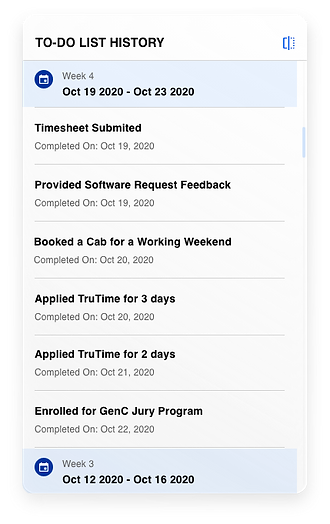
With the amount of tasks and approvals that needs to be done especially at senior levels, to track accomplished activities becomes difficult. The history icon flips the card over allowing the user to browse the history of approvals / to-do items contextually.


Approvals

For senior levels in the organisation an important responsibility is to approve a range of requests coming from team members, starting from leave approval to software approvals. This section caters to this dependability task where you would be presented with all the requests directed towards you and you can not only see the details of the request on hover but also approve them within a click. This sections helps you to give a 'on the go' support to your team whenever required

Easy Sharing
At times it’s important to share the information to a relevant colleague. Easy share feature for policies , referrals & Apps drives the aspect collaboration & connection between employees. For instance a manager wants his team to be aware of a new policy rollout can simply share it directly from the portal itself rather than the email route. The team members would be notified & can take the conversation ahead.

Notifications
Notifications section shows the user system feedbacks along with the organizational announcements(could be pulled in from other external sites) and events. A visual demarcation between textual notifications & events allow easy visual scanning. The notifications can be saved for a week & the scroll allows the user to browse through them.


Dashboard - Smart Search
The search engine in the new One C is intelligence powered. you can type tasks, category, apps or just prompts, the system with its user behavior pattern understanding capabilities will suggest you shortcuts, apps, available media resources (readings, video, podcast etc) and also People who are related to the task in the prompt window. Thus discovering more every time.


Dashboard - Customization
This feature has been designed to give complete control of the dashboard to the associates. The setting icon enables you to add and remove the views basis the user preference. The defaults of My Tools , To-Do List, Announcement & Approvals would always be pinned to the dashboard however can be moved around the visual area for user preferred access.

App Hub
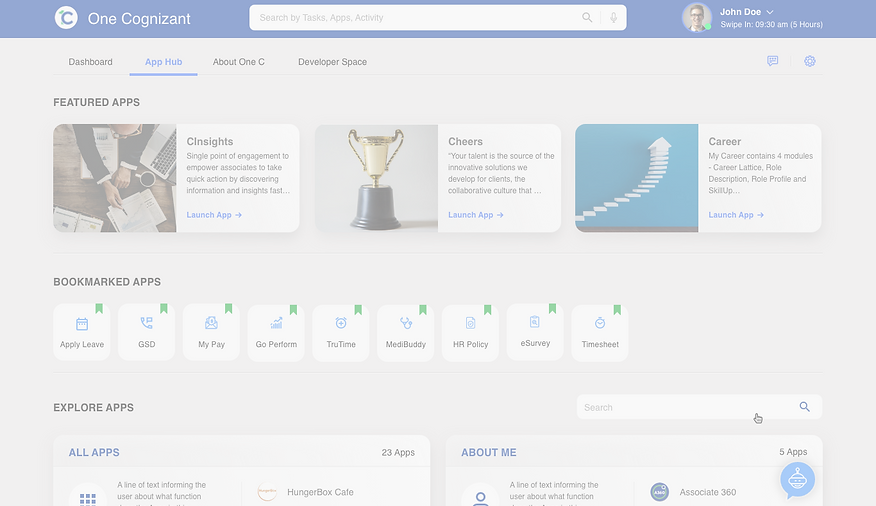
The App Hub page has been designed to give you an intuitive user experience in finding the correct app for performing your task. Starting from discovering a new app every week to managing your bookmarked section to easily finding an app from the treasure house of 800+ apps.
Featured Apps
The newly designed App Hub has a section called 'Featured Apps', where, newly launched apps will be featured.
Along with newly launched apps, this section highlights lesser known apps that are useful yet missed in quantum of information. This section primarily drives discovery and building awareness about One C offerings. The Apps can be promoted basis the updates / specific changing context within the organisation ( Covid 19 scenario) and others.

Explore / Search Apps
This section is the treasure house of all the apps that are available at your disposal. The apps are grouped together in various categories basis their function. The user can browse through the categories with their brief writeup explaining about the category & top three recommended app basis usage.


The user can also quickly access a specific App basis his task/App name by using the search function on the page.The search results would list down the most relevant apps & app categories for easy access.
Every app has a mega card version which gives an overview of the App along with a clear call to action. This would save clicks for the user as he would know more about the App before he launches it.


Explore App Category
Clicking a category opens up an expanded state of card where you can find all the apps belonging to the selected category. To make the search experience quick, the expanded state provides prompt tags which are derived from machine learning capabilities of the system and you can further filter the app search by just clicking the relevant prompt tag.


Day 0 Dashboard
Clicking a category opens up an expanded state of card where you can find all the apps belonging to the selected category. To make the search experience quick, the expanded state provides prompt tags which are derived from machine learning capabilities of the system and you can further filter the app search by just clicking the relevant prompt tag.


Mobile Screens


BROWSE THROUGH SOME OF MY SELECTED PROJECTS

