

Project Brief
GSK scientists spent weeks manually compiling pre-clinical research reports from multiple sources. This process was time-consuming, error-prone, and pulled researchers away from higher-value scientific work. The Robot Reporter application used Machine Learning and Natural Language Processing to auto-generate report sections, streamline collaboration, and reduce report creation from weeks to one day.
COMPANY: Cognizant
ROLE: UX Consultant
SECTOR: Life Sciences
TIMELINE: 5 Weeks
TOOLS: Adobe XD
Goals
-
Recognize the current prototype for Scale and future-proofing technologies.
-
Domain expertise, technical capabilities, and prior implementation best practices are all useful advantages. Develop a minimal viable product (MVP) for pre-clinical In-Vivo Reports.
-
Create a configurable template that can be used for any pre-clinical study and will be useful for automatically creating flexible and scalable reports.
-
Operationalize the ML models, learn them, and maybe apply them to additional business units in the future.

Challenges
-
Compete with another company's offering, which the client was hesitant to use.
-
Timeliness were strict.
-
A manual procedure is being digitized.
Solution
-
Fill in the voids in the functional wireframe and flow.
-
Automate the laboratory testing and reporting procedure.
-
Provide a clear dashboard for navigating through the reports in a streamlined manner.
-
Create a scalable and configurable writing tool.
-
GSK test data management includes tracking, archiving, and updating.
Design Process

Key Insights
Entire process was manual
Scientific study was ignored
Non - compliance issues
Delays in report processing
User Flow Diagram
Blue text indicates gaps in the version of the wireframe shared.

Icons and Components

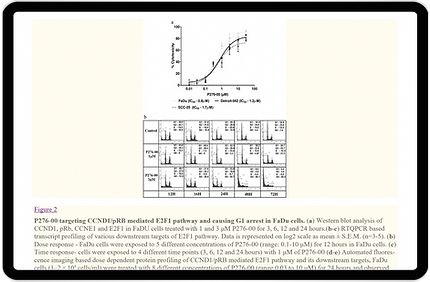
FEW SCREENSHOTS FOR REFERENCE
Before implementation of Robot Reporter
.png)
.png)
.png)
.png)
FOCUSSING ON DETAILS AND CREATING
Visual Delight

Login screen
The goal was to design a user-friendly login interface. Employees at GSK may quickly log in utilizing the organization's single sign-on approach or a username and password.
Dashboard
During the research phase, we determined that this MVP required five roles. As a result, we designed role-specific dashboards to assist users in recognizing the most recent insights from the reports. The image shown depicts the dashboard of a reporter.

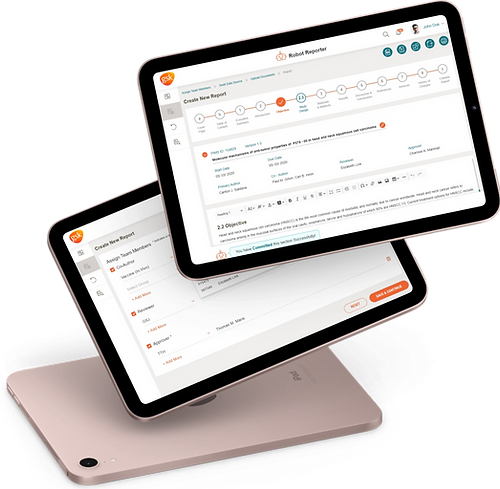
Creating a Report
A reporter must go through a few steps to prepare a report. We have streamlined it by establishing a simple flow.
-
Reporters can create new reports by selecting "new report" from the left navigation menu.
-
Assign team members: The reporter will assign team members as co-authors, reviewers, and approvers at this step.
-
The reporter must enter the sources from which the robot reporter can obtain data with the "seek data source" step.
-
The reporter can upload pertinent report documents using the "upload documents" step.
-
The reporter must fill out all the sections with the help of the robot reporter to generate a report in the "Create New Report" step.
Using Toolbar
GSK researchers and scientists were well-versed in Microsoft Word document software. We utilized the "CKEditor" tool to employ the same mental model. It conveyed information about the application's features simply and effectively. We wanted to decrease the learning curve, which would result in higher productivity.


Initiate Review
The reporter must complete all 13 sections to produce a new report. After the last step, a robot reporter will prompt the reporter to initiate a review process. After the reporter has committed the changes, the reviewer receives the compiled report.
Co-authoring
In the research process, we came across statements like, "I lost all the changes I had made in the previous hour." It took a long time to co-author a document in Microsoft Word. We solved this issue by saving the document in real-time. We also included features like "locking a section." If somebody else is editing a section, it will display a lock symbol. It indicates that somebody else is editing that section.


Interactions
We created a more humanized version of the robot reporter by including engaging text where possible without being overly enthusiastic. Popups capture users' attention rapidly and record all the actions they take.
Review & Finalize Reports
Following the start of the review process, the reviewer selected earlier will be notified. They will have to examine the report. A reviewer can add comments and return them for revision, or they can finalize the report and initiate the approval process.


Updating Report that was sent back after review
If a reviewer has added comments to the report, it will be sent back for revision. We have represented comments across the sections by adding a chat bubble icon so that the reporter can identify and revise the report with ease. They may also reject the comments by stating a valid reason. Once done with the revision, the reporter can again initiate the review process.
Previewing the Report
We've included a preview of the whole report with download and zoom options. It shows a visual representation of how the final report will appear.


